Matrice 300 RTK – Firmware mismatch for TB60 battery and BS60 battery station

DJI On May 21, 2022, a new firmware update was released for the TB60 battery (v01.02.05.44) and the BS60 battery station (v04.00.01.03). This firmware optimizes the charging strategy and improves battery life. However, if the TB60 battery with this firmware (v01.02.05.44) is used with the BS60 battery station running v03.00.01.01 or an earlier firmware version, an alarm may be triggered and the LED indicator light on the battery station may remain solid red.
This problem is caused by incorrect charging strategies and can be fixed by updating the battery station to the latest firmware.
Update.
(TB60: v01.02.05.44, BS60: v04.00.01.03)
The update method is as follows:
1. Insert the batteries into the battery terminals and turn on the Battery Station.
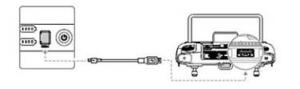
2. Connect the Battery Station to the remote control using a USB-C cable.*
3. Turn on the remote control and make sure it is connected to the internet.
4. Start the DJI Pilot 2 and go to the HMS page.
5. Tap to access the firmware update page.
6. Tap the "Update all" button and wait approximately 10 minutes to complete the firmware update.
If the alarm is still triggered after updating to the latest firmware, please contact [contact information] or directly [contact information]. DJI.
*Infographic Update BS60