The Christmas season is the perfect time to say thank you. Thank you for your trust in futuretrends.ch and trenderia gmbh. We wish you happy holidays, good health, and many positive surprises in the new year.
Opening hours Christmas 2025 / New Year 2026
The futuretrends.ch team will be on vacation from December 20, 2025, through January 6, 2026. We will be back to our regular schedule on January 7, 2026.
Package delivery Christmas 2025 / New Year 2026
Happy holidays and a successful start to the new year!
Patrick, Stephan, Flurina, Benoît and Roger
DJI With Flighthub 2 software, you can plan all your flight missions via the cloud. Real-time monitoring, cloud mapping, and live streaming are among the system's key features. Achieve even better flight results with a software solution designed for both beginners and professionals in the drone field.
Real-time planning, monitoring, and optimization with DJI Flighthub 2
The efficiency and safety of drone flights depend significantly on the software used. DJI Flighthub 2 offers a cloud-based solution that enables interactive, real-time monitoring. This multifunctional system allows you to manage your drones and coordinate entire fleets.
Assess the position of the aircraft throughout the entire flight duration and plan efficient operations in advance. You have access to your data at any time via the secure cloud environment and can manage the recordings you have created. We provide you with the performance of DJI Flighthub 2 in detail.
One-tap panorama synchronization
With just one click, you can create a 360° panoramic overview and upload it directly to the cloud system. Share the images and coordinates via your 2.5D base map of the operation and allow teammates to access them. This way, the entire team always has an overview of the current situation and can carry out their operations even more precisely.
With the 2.5D basemap, you can directly input elevation data into existing satellite maps and later enhance them with your recorded panoramas. This allows you to integrate specific terrain data into flight planning.
Convenient mapping directly via the cloud
Within a single flight, you can create infrared or true-color orthomosaic maps covering an area of up to 1,5 square kilometers. The generated mosaics are automatically transferred to the 2.5D base map and made available to the team via the cloud. View the environment of your mission in precise detail, if needed, to check and, if necessary, modify the planned route.
The real-time cloud-based transmission system allows multiple members of a drone team to interact with each other. Low latency and high-resolution transmission ensure that all team members are informed about the developing situation in real time.
Efficient cloud-to-ground synergy with the new Flighthub 2 from DJI
To simplify tasks and planning steps within the team, you can add live comments during the flight and visually highlight areas of interest. The changes are transmitted to all team members in real time, allowing for reorientation or optimization of the flight plan as needed.
To improve team communication, Flighthub 2 relies on the real-time transmission of mission details, the positions of individual team members, and drone status. Flighthub 2 is available on numerous device types and is therefore aimed at a broad target audience.
DJI Flighthub 2 with real-time transmission
Optimized management of all missions from the cloud – this is how you plan your flight routes.
Its 2.5D base map allows you to conveniently create various flight missions on your computer. Preview the expected results to ensure data transmission quality and flight route safety.
Synchronize planned missions with your drone flight team to ensure smooth execution. Real-time communication allows you to cancel, modify, or comment on missions at any time during flight.
You can conveniently review the results of your previous flights on your PC in the cloud. View the generated data, including images and videos. It is automatically placed on the 2.5D base map to visualize each stage of the mission. The software's user-friendly interface ensures that you can easily manage the data. DJI Flighthub 2 can be used even without in-depth online knowledge.
The efficiency and safety of drone flights depend significantly on the software used.
FAQ: The most important questions about Flighthub 2 DJI
Do you have questions about Flighthub 2? DJIOur team is always happy to advise you. We have compiled the most frequently asked questions from our customers in the FAQs below.
Are the transferred data at DJI Flighthub 2 safe?
DJI The company prioritizes data security and utilizes industry-leading protection measures to ensure the integrity of flight data, videos, and photos. Data transfer to the cloud-based fleet management system is subject to the highest security standards. The accessing and transmitting device is authenticated before each access.
Are there different versions of Flighthub 2?
DJI Flighthub 2 is available in a free standard version and a professional version. Member and organization management are standard features in both versions, as is device management. The professional version allows for an unlimited number of projects, while the basic version limits the management of a maximum of five. The paid version is better suited for professional and frequent use, as it offers significantly more storage space and valuable additional features.
Which drones are available DJI Flighthub 2 compatible?
The cloud-based system is used in the latest aircraft. It is compatible. DJI Flighthub 2 with the two DJI Docks (1 and 2), the Matrice 30 series, the DJI Mavic Enterprise series (3E, 3T) as well as the drones Matrice 300 and 350 RTK. The use of the [unclear text] is also supported. DJI Docks with the Matrice 30 series.
who needs DJI Flighthub 2 for drone flights?
From the use of the DJI Flighthub 2 Systems benefits drone operators who prioritize increased safety in the air. Planned drone operations can be efficiently created, monitored, and managed via the central platform.
Precise mission planning reduces flight time and facilitates decision-making. Real-time data transmission is particularly important for team operations to ensure continuous communication between all members. Flighthub 2 helps to significantly reduce the risk of collisions and minimize safety risks.
Which cloud servers are used for DJI Used Flighthub 2?
DJI It prioritizes maximum security and uses Amazon Web Services for storing all data. With a good network connection, this ensures live streams in less than a second.
Is it possible to download recorded data from the cloud?
Video recordings captured via livestream can be downloaded directly from the library to the desired device. The data is provided in M3U8 format and can be played back on smartphones, tablets, and computers using a compatible video recorder. No additional software is required to use the cloud service. DJI-Account required, it will be the unified user account of DJI-Customers used.
join DJI Install Flighthub 2 and take off cloud-based
Opt for the professional version today! DJI Flighthub 2 allows you to plan and execute your drone flights even more efficiently. The basic version allows a maximum of five projects, which is clearly insufficient for frequent flyers.
The newest Enterprise-model from the company DJI is the Mavic 3E, with a focus on photogrammetry. Compared to the consumer version. Mavic Version 3 not only shows a higher price, but above all a significantly modified range of functions.
You can assume that you are familiar with the DJI Mavic Choose the 3E as the most important drone in the field of photogrammetry. Learn everything you need to know about this model now!
Precise mapping using high-performance cameras – the equipment of the DJI Mavic 3E in detail
The drone photogrammetry system has become a new benchmark. DJI Mavic The 3E is equipped with multiple high-performance cameras. It delivers unsurpassed image quality and detailed precision, making it the tool of choice for 3D modeling and mapping.
20 megapixel resolution for the main camera
The wide-angle camera features a 4/3 CMOS sensor and delivers razor-sharp 20-megapixel images. The field of view is 84°, and the focus extends from one meter to infinity.
The electronic shutter speed ranges from 8 to 1/8000 of a second, while the mechanical shutter speed ranges from 8 to 1/2000 of a second. In photo mode, the camera captures 20-megapixel images in JPEG and JPEG+RAW formats.
Panoramic images are shot in RAW mode at 20 MP, and intelligent low-light photos also reach 20 MP. This makes sharp photographs for mapping possible even in less than ideal lighting conditions.
The video resolution in 4K is 3840×2160, but it only achieves 30 FPS. This is one of the biggest differences compared to the customer model; the high megapixel count of the main camera reduces the FPS, although this is hardly noticeable. The bitrate of 130 Mbit/s in 4K mode, on the other hand, is quite respectable.
Telephoto camera with powerful performance and magnification effect
Purchase a [item] through us DJI Mavic With the 3E drone, you get an all-rounder for precise mapping. In addition to the wide-angle camera, the model features a 12 MP telephoto camera with a 15° field of view. The 162 mm focal length and a focus range of three meters to infinity complete its performance capabilities.
The telephoto camera mode delivers JPEG images with a maximum size of 4000 x 3000. Both single and interval shots are captured at 12 MP. Video resolution in 4K mode is 3840 x 2160 at a constant 30 FPS. The 8x digital hybrid zoom facilitates precise subject identification.
DJI Mavic 3E is equipped with top-of-the-line cameras.
Top camera performance coming soon – buy with the DJI Mavic 3E the drone of the future
Technical specifications sound good in theory, but say little about the drone's actual performance. Purchase a DJI Mavic 3E, we have summarized the camera advantages of the high-performance model for you:
Performance improvement: The Mavic The 3E features an intelligent night scene mode. This gives it significantly better performance in low light conditions.
Measurement: With its 4/3 CMOS wide-angle sensor, the camera not only delivers a clear view, but also, thanks to the mechanical shutter, an additional option that prevents motion blur. Capture interval shots at a precise maximum speed (0,7 seconds). You don't need a control point to carry out efficient mapping operations at a rapid pace.
Zoom camera: Take advantage of the 12 MP zoom camera with a 56x hybrid zoom. This allows you to see all the important details, even from a distance.
DJI Mavic 3E in flight
High operating efficiency – rely on dependable and long battery life.
A crucial characteristic for the quality of a drone is its flight time. DJI Mavic Thanks to its powerful batteries, the 3E provides you with a maximum flight time of 45 minutes.
Survey up to two square kilometers in a single flight session, ensuring maximum operational efficiency. When the batteries are depleted, recharge them either directly on the drone or using the included charging station. The drone automatically returns to the optimal takeoff point after completing its work.
The included charging station
Equipped with four antennas, this next-generation drone delivers reliable real-time image transmission even in challenging environmental conditions. The wide-angle lenses on the sides prevent collisions with obstacles and make even "blind spots" visible.
Depending on the application, the braking distance and intelligent collision warnings ensure greater flight safety. Thanks to APAS 5.0, the drone automatically steers around detected obstacles, allowing you to conduct mapping missions at the highest safety level.
Improved software to support the DJI Mavic 3E drone in flight
Your new mapping drone will be provided with a high-performance software package consisting of four components. DJI Flighthub 2 enables cloud-based drone management with cloud mapping capabilities and live annotations. This ensures seamless cloud-to-ground synergy. Manage all your flights efficiently with digital mission management and optimized route planning.
You can access the drone and payload control with a single click using the DJI Install Pilot 2 software. View all navigation and flight details at a glance and benefit from simplified operation and increased flight safety.
DJI Terra is the most advanced mapping software and offers you the best possible technical support during all phases of your work. Plan your operations and conveniently process all images in 2D and 3D modes.
In addition, there is the DJI Use version 3.0 of the thermal imaging analysis tool. Annotate, analyze, and process the captured images to detect temperature-based anomalies in real time.
You can assume that you are familiar with the DJI Mavic 3E is the most important drone in the field of photogrammetry.
FAQ: The most important questions about DJI Mavic 3E
Do you have any questions about the DJI Mavic 3E? Our team is always happy to advise you. We have compiled the most frequently asked questions from our customers in the FAQs below.
Who is it for DJI Mavic Suitable for 3E?
This high-performance aircraft represents the future of modern mapping. It is suitable for both novice and experienced pilots who want to conduct mapping flights quickly and with maximum efficiency.
How can the thermal imaging camera be protected?
Make sure you check the lenses of the DJI Mavic Do not expose the 3E to laser, lava, or sunlight. Although the functionality and quality of the lenses are of the highest level, direct exposure can cause damage.
How good are the survey results of the DJI Mavic 3E?
Thanks to the mechanical shutter and the size of the 4/3 sensor with an image quality of 20MP, the DJI Mavic The 3E is perfect for all surveying flights. Compared to its predecessor, the surface area is doubled, ensuring the best possible results even in poor visibility conditions.
Is prior flight planning with the DJI Mavic 3E possible?
The drone comes standard with a flight planning function. You don't need any third-party software to plan all your mapping missions in advance.
Now the top drone DJI Mavic Buy 3E and start mapping!
Are you looking to invest in a multifunctional drone model of the future? Choose the top drone. DJI Mavic 3E, specifically optimized for mapping flights. Rely on its high performance and perfectly calibrated software. Buy your piece of the future directly from us!
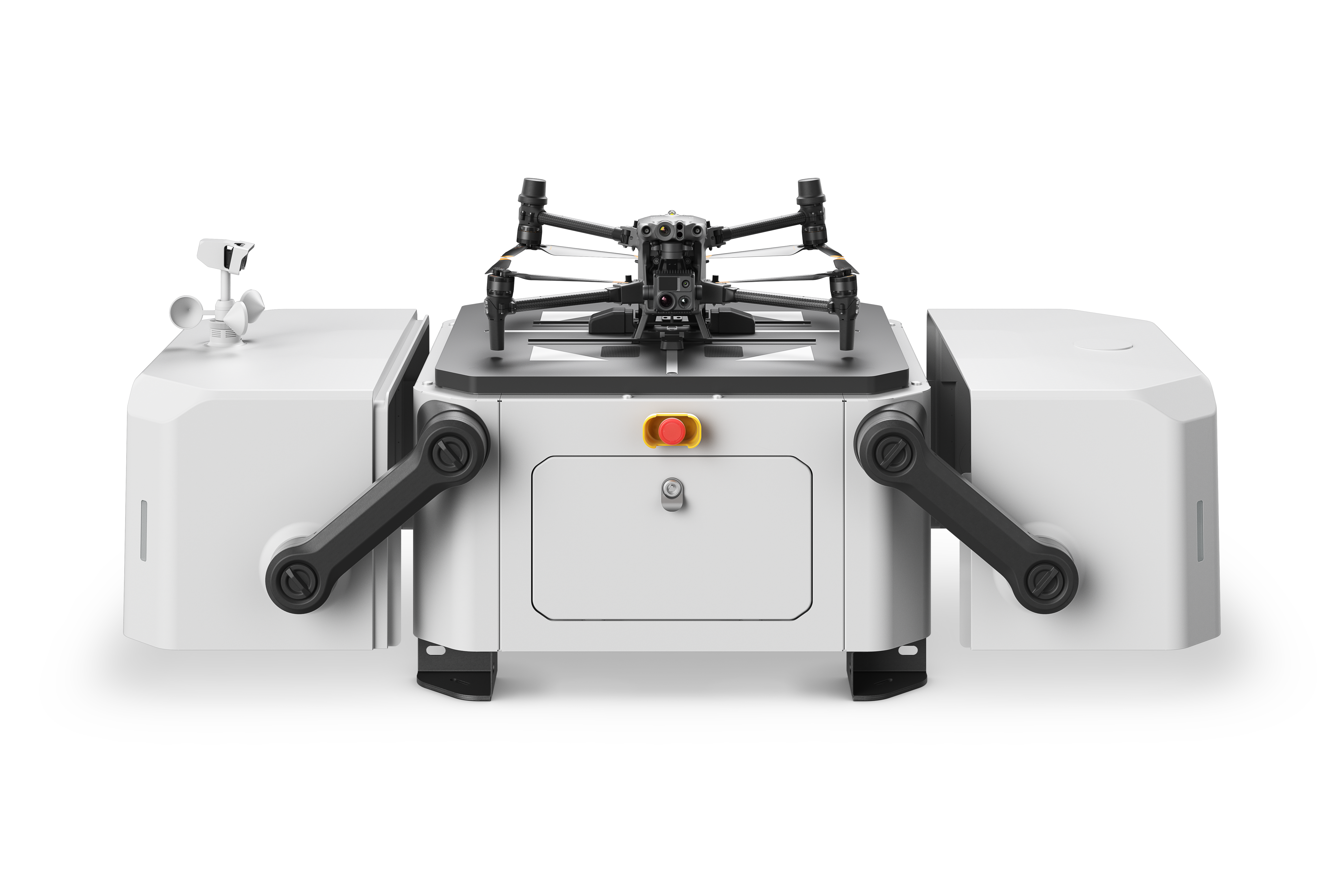
With the new Dock 2 from the company DJI A new and powerful garage for your drones is now available. The model is equipped with the newly launched 3D/3TD series.
These drones are of outstanding quality, especially in the field of mapping and surveying flights. At the same time, they provide precise support for inspection and security work.
The Dock 2 will be launched in the first quarter of 2024 and comes equipped with a large number of intelligent features.
DJI Dock 2 closed
Lightweight with high performance – the DJI Dock 2 in comparison
In direct comparison with its predecessor, Dock 1, the newly launched Dock 2 is noticeably lighter at 34 kilograms. It allows docked drones a maximum flight time of 50 minutes, compared to 40 minutes for the previous model. The range is also new, now 10 kilometers, up from 7 kilometers.
In the area of recharging, the new DJIThe system uses inductive charging, whereas Dock 1 still required contact charging. The sliding alignment system replaces the previous push-pull system, bringing a host of technical innovations to the market.
All of this is housed under a casing measuring 570 x 583 x 465 mm. In comparison, the Dock 1 system, at 800 x 885 x 1065 mm, was significantly larger.
M3D and M3DT for Dock 2 – significantly more powerful than their predecessors
If you decide to purchase the Dock 2, you can also look forward to significantly improved performance in the area of drones. The comparison looks like this:
M30 Dock (1) Version vs. M30 Dock (2) Version:
Wide angle camera: Dock 1 with 1/2 CMOS at 12 MP vs. 4/3 CMOS 20 MP
Zoom camera: Dock 1 with 1/2" CMOS at 48 MP vs. 1/2" CMOS at 12 MP with 58x hybrid zoom
Magnetic Fastener: M30 Dock 1 without mechanical shutter vs. equipped with a 0,7 s mechanical shutter for shake-free images.
M3TD Dock (1) Version vs. M3TD Dock (2) Version:
Wide angle camera: M3TD Dock 1 with 1/2 CMOS 12 MP vs. 1/1.32 CMOS 48 MP
Zoom camera: 1/2" CMOS 48 MB with 16x optical zoom vs. 1/2" CMOS 12 MP with 56x hybrid zoom
Thermal camera: 640 x 512 at 30 HZ vs. 640 x 512 at 30 FPS
DJI Dock 2 opened
Functionality of the DJI Dock 2 – High-level performance
Demand for the DJI Dock 2 at a high level
Denn: DJI This brings a precision device to the market for experienced drone enthusiasts and beginners alike. The technical and fundamental specifications are impressive, not only compared to the previous model, but also on their own.
These are the features you need to know:
Total weight of the unit: Weighing in at 34 kilograms, the new DJI Dock 2 is approximately 68 percent lighter than its predecessor.
Dimensions: The 0,5 x 0,5 x 0,5 meter dimensions ensure improved handling and are more convenient compared to the DJI Dock 1 for a size reduction of 75%.
Loading speed: For quick charging in between flights, the drone's batteries can reach 90% full charge within 32 minutes (starting from 20% remaining capacity).
Wind speed: Landings are possible at wind speeds of up to eight meters per second.
Antenna: The DJI Dock 2 Station is equipped with a dual GNSS RTK antenna and features O3-Enterprise-Connectivity.
Battery capacity: The included battery is able to keep the Dock 2 station running for up to five hours.
Waterproof: The entire station is waterproof and has been certified according to IP55 standard.
Ambient temperature: Dock 2 operates reliably at an outside temperature between -25° and +45°.
FAQ: The most important questions about DJI Dock 2
Do you have any questions about the DJI Dock 2? Our team is always happy to advise you. We have compiled the most frequently asked questions from our customers in the FAQs below.
For which drones is the DJI Suitable for Dock 2?
The DJI Dock 2 is specifically designed for the DJI Matrice The 3D and 3DT series drones are designed for a wide range of applications, including security and inspection flights, mapping, and surveying. Compared to their predecessors, they offer improved performance and efficiency.
What are the biggest advantages of the DJI Dock 2 compared to its predecessor?
Compared to its predecessor (DJI Dock 1) offers a number of advantages. Its lighter weight facilitates transport, and the backup battery life is up to five hours. In the event of a power outage in a complex environment, Dock 2 thus maintains operation and boasts high reliability. The operating temperature range has been extended, making it suitable for use in various environments.
Who is it for DJI Suitable for Dock 2?
The new station is ideal for all drone professionals who use their drones regularly. Areas such as inspection, construction, security, and surveying are enhanced with the two selectable drones. DJI Dock 2 is optimally covered.
Is the DJI Dock 2 for use in difficult conditions?
The new DJI Dock 2 was designed, among other things, for use in extreme weather conditions. It can withstand high wind speeds and is additionally protected against water and dust with protection class IP55. The extended temperature range will allow flights in future even in extreme cold and heat conditions.
What security features can the DJI Dock 2 scores?
The exceptionally long energy supply during power outages (five hours) makes the DJI Dock 2 is the perfect companion in challenging situations. Its comprehensive surge protection system reliably prevents incidents. Equipped with state-of-the-art software and sensors, the station is capable of guiding even inexperienced drone pilots.
Now is the time to buy the coveted DJI Dock 2
In Europe, the DJI Dock 2 is expected to launch in the first quarter of 2024. Since the specifications were announced in China, indirect demand has risen significantly. The new model distinguishes itself from the previous model in numerous ways. DJI Dock 1 is available and is in high demand in both professional and private sectors due to its compatibility with two high-performance drones.
Secure your DJI Dock 2 will be available from us as soon as it is on the market. Whether for security flights, inspections, construction site monitoring, or reliable mapping – the new docking station, along with the next-generation drones, represents a step towards the future of efficient drone use. It is expected that the DJI Dock 2 is quickly sold out due to high demand, so act in time!
Workflow of a roof inspection using a drone (DJI M3E/M3T)
The increasing number of commercial buildings in Switzerland is driving up demand for safe and effective roof inspections. Each roof has unique requirements, and various areas may need inspection, such as leaks, holes, and components that require regular checks.
Drones have transformed the way roof inspections are conducted over the past decade. Their use allows for efficient data collection without the need for ladders or entering the attic. The information gathered can then be easily shared and processed.
In this article, we will look at the process of a roof inspection using a drone (DJI M3E/M3T)
Table of Contents
collect data
Data collection: At the start of the inspection, relevant information about the building is collected. This includes data such as the size, shape, and pitch of the roof.
Property inspection: The roof is visually inspected for potential damage and defects. Drone footage can be used to conduct a detailed assessment.
Defining the inspection area: The area to be inspected is defined. Specific areas such as solar panels or ventilation systems can be the focus.
Checking sensor settings: The drone's sensor settings are checked and adjusted to ensure the best possible data acquisition.
Flight planning: A flight plan is created to ensure optimal coverage of the inspection area.
Data collection: The drone is launched and collects data through visual and thermal imaging.
Manual inspection: A manual inspection can be carried out to examine specific areas more closely.
Data Processing:
Data processing: The collected data is processed to enable an accurate analysis of the inspection data.
Thermal and visual datasets: The thermal and visual datasets are combined to create a detailed inspection analysis.
Ground control points/checkpoints: Ground control points are used to ensure more accurate referencing of inspection data.
DJI Terra settings: DJI Terra settings can be used to perform effective data evaluation and analysis.
Collect data and define the inspection area for drone inspection of roofs
To successfully conduct a drone inspection of a roof, certain aspects must be considered. First, the size of the roof must be taken into account to understand the scope of the project and plan accordingly. Smaller roofs can be inspected in a few minutes or even seconds, while larger commercial roofs may require longer flight times.
The building's height is another important factor to consider when planning the mission. A short flight time to the top of the building allows for better operational planning.
Define inspection area
To define the objective of the inspection, it is important to know what objects are located on the roof. The type of inspection and the associated requirements for accuracy and resolution can vary depending on the objective.
The most important use cases for roof inspections are
Detection of cracks and leaks
Air conditioning inspections
Inspections of photovoltaic systems
Chimney/exhaust gas inspections
Requirements for the measurement or desired results
Roof inspection
When thermal imaging sensors are used to inspect, for example, solar panels, leaks, or air conditioning systems, the flight should be conducted immediately after sunset to avoid thermal stress from direct sunlight. When searching for leaks, at least 24 hours should be allowed to pass after a rain shower to understand the drainage/leakage. The size of the building should be taken into account when planning the flight route to avoid unnecessary flight time.
Data accuracy requirements are another important aspect to consider when planning drone inspections. With the Mavic 3 Enterprise With the RTK module, centimeter-accurate data can be generated without the need for ground control points. This data can also be compared with other construction site data to achieve greater accuracy. RTK, PPK, and cloud PPK technologies can help achieve a high level of accuracy.
Checking camera settings for a roof inspection
To ensure safe flight conditions, the sensor settings must also be checked. Several factors must be considered when choosing camera/sensor settings, such as exposure time, ISO sensitivity, and color correction. By selecting these settings correctly, clear and accurate images can be captured, contributing to an effective roof inspection.
Recommended settings
shutter speed A shutter speed of 1/1000 or faster is recommended for daytime flights. Motion blur plays a significant role during night flights. Therefore, try to set the shutter speed as fast as possible without losing sight of the roof.
Take advantage of the ISO valueto compensate for the shutter speed. During the day it is best to set the ISO value to Auto, but for night flights you can use it to "brighten" the image if you need to use shorter shutter speeds.
Image format: JPG
Image format: 4:3
Mechanical trigger: EIN
Sensors to be detected (in thermal imaging): ALL
For thermal inspections, we generally recommend setting the color palette to iron red, as there are large color differences at different temperatures within the camera's field of view.
We also recommend taking the time to do a short flyover of the roof at the beginning. This can help you find the best camera settings before the flight. A roof can often be much brighter than you think, and if you manually adjust the camera settings at the first waypoint, the images are often "washed out".
Planning a flight for roof inspection with a drone
The most common method for inspecting a roof is to collect enough overlapping photos to create a high-resolution map and a 3D model of the roof. This can be done with the DJI Pilot 2 App will be performed if you Mavic 3 Enterprise Use Series drone.
When planning inspections, it is best to select the Mapping Mission option. Here you will find a guide to help you get started with Mapping Missions.
And here are some settings we specifically recommend for roof inspections:
Use the default overlap settings of 70% and 80% front overlap. This should be sufficient for high-quality 3D model reconstruction for the visual sensor.
If thermal imaging is required, we recommend 80% sidelap and frontlap.
When selecting the altitude, you should use the two sliders: flight route altitude and target area to takeoff point. The optimal flight altitude over a residential roof is 5-15 meters above the roofline. This resolution may not be achievable for larger commercial buildings, so planning for 15-30 meters above the roof should be sufficient. A short flight to verify the building height will help you determine the appropriate mission altitude. For example, if you are checking the height of a residential roof and it is 8 meters high, set the target area to 8 meters and the mission altitude to 15-25 meters. If you are checking a commercial roof that is 15 meters high, set the target area to 15 meters and the flight route altitude to 30-45 meters.
The Target Surface to Takeoff Point slider allows you to achieve the correct overlap settings even when the drone is launched from the ground. With the 4/3″ sensor of the Mavic 3 Enterprise You can capture incredible detail with a wide dynamic range.
Here are some GSD estimates using the M3E ( DJI Mavic 3 Enterprise ):
7,50 meters 0,2 cm/pixel
15,00 meters 0,4 cm/pixel
22,50 meters 0,6 cm/pixel
30,00 meters 0,8 cm/pixel
Here are some GSD estimates using M3T ( DJI Mavic 3 Thermal ):
The software offers the following for creating a 3D reconstruction: Mavic 3 EnterpriseThe series offers the Smart Oblique function, which allows for taking oblique images during flight, instead of just taking NADIR shots. This allows the Gimbal It can be controlled during flight. However, Smart Oblique should not be used for solar inspections on roofs with thermal updrafts, as this can affect the accuracy of temperature measurements.
Flight direction and speed are other important factors that should be considered. Mavic 3 Enterprise It is equipped with a mechanical 4/3″ shutter that enables fast shooting with minimal image distortion. The flight speed is suitable for the Mavic 3 Enterprise Not so important, but if the goal is thermal inspection with the M3T, the maximum speed should be below 4,4 m/s (10 mph) to avoid image blurring and incorrect image measurements from the thermal sensor.
If you are planning the flight direction and only want to capture visual images, you should fly in the most efficient direction. When inspecting thermal solar panels on roofs, it is recommended to fly parallel to the panels to achieve the best results in data processing.
Data collection
When you are ready to capture the location, you should ensure that you can maintain a line of sight with your drone, which can be difficult when capturing building roofs.
Make sure to keep a close eye on the drone's flight plan and the FPV camera to ensure you do not fly over people.
Manual verification and inspection of the data
After the automated mission is complete, you can manually collect additional data to get the most out of your inspection. Mavic 3 Enterprise and Mavic Both 3 Thermal devices feature a 56x hybrid telephoto zoom sensor, allowing you to better understand the target during manual inspection. To keep the zoom and thermal imaging sensors at the same zoom level, we recommend using the Link Zoom function (side-by-side view).
Data Processing:
The processing of thermal and visual datasets begins after site acquisition and includes conversion into a high-quality 2D orthomosaic and 3D model. The use of DJI Terra enables a simple and effective process for generating high-quality datasets. The following step-by-step process shows how to use data with DJI EARTH can be processed:
Importing photos/folders into DJI Earth.
It is recommended to process visual and thermal data sets separately.
Selection of desired output types (2D map, 3D model) and file extensions (Tiff, Obj, etc.) as well as definition of the coordinate system [Switzerland: LV95]
(if an NTRIP service is used).
Start of the aerotriangulation.
Optionally, the reconstruction limits can be changed to optimize processing time and output data size.
Optional step: Import of ground control point data and selection of the appropriate EPSG code for the region (Switzerland: EPSG Code: 21781).
Execution of the steps for reconstructing the 2D map and the 3D model.
Please notice that DJI Terra does not guarantee a radiometrically composited output, only the raw images. Once processing is complete, the accuracy report can be used to verify map accuracy. The data is now ready to view and export. We recommend that you DJI Try Terra with a 1-month trial version, which is based on the DJI The Terra website is available.
Show data
DJI Terra offers various functions for data visualization and analysis. Our annotation tools allow you to measure cracks and leaks, while navigation within the 3D model is controlled via the mouse. A tool is available for long-term viewing, allowing you to orbit the 3D model indefinitely.
For example, in roof inspections, 2D orthomosaics (orthophotos) are often used to analyze leaks, cracks, and thermal irregularities, rather than 3D models. While 3D models facilitate viewing the site from a specific perspective, raw images are often analyzed for thermal inspections instead of the 3D model. For clients requesting a dataset, [the company] offers DJI Terra supported outputs that are georeferenced and can be imported into a third-party analytics tool such as DroneDeploy or PixPro can be imported.
DJI It also has a thermal analysis tool that can be used to examine raw images and processed datasets to gain a complete understanding of temperature measurements. There is also a publicly available tool from Eric Olsen, which allows thermal data to be converted into RJPG for import into Flir's thermal analysis tools.
Third-party analytics providers
For automating inspection analyses, there are many specialized third-party solutions. Providers like DroneDeploy offer cloud-based tools for various industries such as construction, agriculture, oil and gas, and solar. For roof inspections, DroneDeploy offers specialized tools and reports, such as the Roof Report, which determines roof dimensions based on a processed 3D model, but does not offer automatic damage detection.
DroneDeploy offers a radiometric thermal analysis tool that assists in identifying problems within a heat map. The histogram on the left can be used to change the temperature range. Additionally, there is a tool for comparing multiple flight data points to identify differences.
If the focus is on damage detection, then Loveland Innovations and Eagleview Good options for automated damage detection. Their tools can detect not only hairline cracks, but also small holes and indentations caused by hail or tree damage. To analyze the data, the web tool IMGING from LoveLand Innovation or the sample report page from Eagleview are recommended.
For thermal imaging analysis of solar modules Raptor Maps Raptor Maps' tools are well-known. With over 50 GW of solar modules analyzed to date, they are the first choice for solar module analysis. A screenshot from the tool illustrates the solar module inspection process.
Final
In conclusion, it is recommended to use drones for roof inspections, as this can save time, personnel and inspection quality; above all, you have significantly higher occupational safety than before.
If you have any questions about the use of drones in inspection procedures, please feel free to contact us. us .
DJI Dock: Autonomous docking for programmed flights in remote areas
The DJI Dock is an autonomous take-off, landing, and charging station that enables fully automated, programmed flights with the DJI M30 series (dock version) enabled. It expands the horizons for automated missions that can be monitored and controlled remotely. Once set up, the fully charged M30 drone can be launched from DJI Dock launches automated missions programmed via FlightHub 2 within a radius of 7 km.
Fast rotary operation Once the drone has landed after its mission, it automatically recharges. Thanks to the fast-charging and battery cooling system, the drone can take off again just 25 minutes after landing.
Excellent adaptability to the environment: The modular, robust design allows for continuous operation day and night, regardless of the weather. DJI The dock was built to last and require minimal care and maintenance. The dock meets protection class standards. IP55K and the most important internal components of the protection class IP67K, which makes it waterproof and dustproof, even when open. The interior of the DJI The dock is climate-controlled to bring the batteries to the optimal temperature, ensuring the M30 functions properly even in ambient temperatures of -35 to 50 degrees Celsius can be charged safely.
Its connectivity can be expanded thanks to a port for an external 4G dongle[1]. In the event of a disaster-related power outage, an internal battery takes over the operation of the dock and ensures that the M30 returns safely from its mission.
Easy to set up, easy to unfold: The DJI The dock weighs only 90 kg, covers an area of less than one square meter, and can be transported by elevator; it simply needs to be secured to the floor, switched on, connected to a power supply, and connected to the internet. DJI The dock features integrated antennas, a weather station, ultra-wide-angle surveillance cameras, and a D-RTK base station. Installation is a single step, and the integrated design significantly reduces deployment complexity.
The DJI Dock is also extremely easy and convenient to set up and configure. This can be done directly on-site with the DJI RC Plus, which provides complete control over the dock and the M30, the missions and their planning, as well as the collected data.
Ready for expanded regulations: The DJI Dock opens up new possibilities for many areas that can benefit from automated flights, such as infrastructure inspection, construction site monitoring, and technical surveillance. In areas where drones are permitted to fly autonomously, unattended, or beyond the operator's line of sight, this is particularly relevant. DJI Dock ready to enable these operations, with remote monitoring from another location via FlightHub 2 [2]
Photo series DJI Dock
DJI Dock in Action
DJI Dock
DJI Dock closed
DJI Dock closed
DJI Dock closed
DJI Dock open
DJI Dock open
DJI Dock open
DJI Dock open
Availability and prices DJI Dock
It is expected that DJI The dock will be available in Europe in Q4/2022, at an expected price of CHF 25999 for the M30 variant and CHF 29999 for the M30/T variant.
[1] 4G availability varies in different countries and regions
[2] The DJI Dock must be used in accordance with applicable laws and regulations, and its advanced features cannot yet be used in countries where a human pilot must remain within line of sight of the drone or maintain physical control over the drone by holding a controller.
The DJI FlightHub 2 is the fleet management software from DJI EnterpriseIt benefits from significant improvements over the first version and synchronizes and coordinates between ground teams at work, the drones, the payloads, the pilots, and all the data they collect. DJI FlightHub 2 is now fully cloud-based. It allows flight mission management and operational views not only from the pilot's remote control, but from any device with a web browser, such as computers, tablets, and even mobile devices.
Now everyone involved in a drone operation, from ground teams to nearby superiors to managers in their offices, can log into the same mission and view the data collected by the drones and pilots.
The DJI FlightHub 2 supports Mapping functions, which allow the user to react quickly to evolving situations.
The DJI FlightHub 2 supports Live Pin Points, meaning points, lines, or polygons that the user can draw on the map. Thanks to the laser rangefinder of the DJI M30 During a search and rescue operation, a pilot can precisely determine the coordinates of a missing person. These coordinates are automatically transmitted via the mission interface. DJI FlightHub 2 synchronizes data so that the command center and ground team have live coordinate updates and can simultaneously create rescue routes. All of this maps, models, and inspection data can be uploaded to the AWS-powered cloud and accessed and managed remotely.
DJI FlightHub 2 is becoming indispensable software for optimizing communication between the command center and the team on the ground and for managing real-time missions.
Availability and prices DJI Flighthub 2.0
Flighthub 2.0 is currently being offered as a free public beta. until October 31, 2022.
Fawn rescue using a thermal imaging droneThe use of drones in fawn rescue has become well established in Switzerland and beyond, a mostly volunteer-run movement for the welfare of the animals. Fawn Rescue Switzerland regularly organizes information events about fawn rescue. You can register directly here. Login, With the DJI Mavic 2 Enterprise Advanced delivers DJI In a compact complete set, this is the ultimate tool for fawn rescue. But what makes this drone so ingenious and helpful? – The built-in thermal imaging camera with a resolution of 640×512px helps detect fawns in a field, and the equally integrated 48 MP RGB camera allows you to verify the find. Such specifications were previously only available in larger and more expensive systems. With the help of the Mavic 2 Enterprise With advanced features and a 640x512px resolution, the search for fawns is efficient and safe.
The search for fawns
But let's take a closer look at the fawn rescue issue: when does the fawn rescue season start, how does the fawn rescue work, how do you program the drone, and what are the optimal settings?
The peak season for fawn rescue is May to JuneThe best time to fly is always at dawn, when the field is still cold and the thermal imaging camera can optimally detect the temperature difference between the ground and a live fawn. This is when the success rate is highest. The best detection chances are between 9 PM and 8 AM.
For fawn rescue with a Mavic 2 Enterprise Advanced we recommend a flight altitude of 40-80m Depending on the pilot's skills and experience. The lower the altitude, the more accurate the results.
The complete solution for fawn rescue
The complete solution for fawn rescue comes with DJI Smart Controller and pre-installed DJI Pilot App. By means of DJI Pilot App can be used via «Mission Flight» Easily mark the field to be flown to and then automatically fly along straight flight paths. To make the search efficient and successful, we recommend... Overlap rate from Up to 10%We often choose a filter for the thermal imaging camera. WhiteHot and BlackHot. The display on the Smartcontroller can be used, for example, in the practical Split Mode When operating in this way, the left half of the screen can be used for the thermal image and the right half for the RGB normal image.
The kit
The Mavic 2 Enterprise The Advanced Kit comes in a shockproof, robust case and includes all components required for flight:
1x DJI Mavic 2 Enterprise Advanced with thermal imaging camera 640x512px
1x Smart remote control
1x Intelligent flight battery (self-heating)
3x propeller pair
1x battery charger
1x power cable
1x USB 3.0 Type C data cable
1x USB adapter
1x Gimbalschutz
1x replacement control stick (pair)
1x RC cable (Lightning connector, incl. slider)
1x RC cable (standard micro-USB connector, including slider)
1x RC cable (USB-C connector, incl. slider)
1x Expansion slot cover
1x M2E headlight
1x M2E speaker
1x M2E Collision Warning Light
1x carrying case
1x manual
Have we piqued your interest?
Your direct route to Mavic 2 Enterprise AdvancedOrder directly from our online shop, request a quote, or contact us. Contact You can view and test-fly the product in our showroom at any time.
With a maximum payload of 40 kg, the DJI The Agras T30 takes aerial spraying efficiency to a new level. A revolutionary transforming body offers exceptional spraying, especially for fruit trees. (With the digital agricultural solutions from...) DJI The T30 helps to reduce fertilizer consumption and increase yield production in an effective, data-driven way.
Highlights
30 l spray tank
Spherical radar system
Overall IP67 water resistance
Two FPV cameras for monitoring
Fully autonomous, high-precision operation
Cloud platform for smart agriculture
With its revolutionary branch alignment technology and adjustable arms, the Agras T30 penetrates thick tree canopies with angled sprayers to ensure even adhesion of liquid pesticides and increase the number of droplets by 100%. Using the Smart Agriculture Cloud platform and cloud-based mapping, users can manage a digital 3D orchard on their smartphone, simplifying the transition to digital farming.
16 spray nozzles
Sixteen spray nozzles provide comprehensive coverage with even distribution, strong penetration, and exceptional drift prevention. Eight sets of solenoid valves enable independent variable frequency control and even sequential spraying. The horizontally opposed six-cylinder twin-piston pump design delivers powerful spray performance and a high flow rate of up to 8 liters per minute.
Equipped with a large 30 kg spray tank, the Agras T30 increases the spray width to 9 meters and the field spraying efficiency to 40 acres/hour, 33,3% more than the previous generation.
Eliminate blind spots with a spherical radar system
A spherical radar system detects obstacles and surroundings in all environments, weather conditions, and viewing angles, regardless of dust and light interference. Automatic obstacle avoidance and adaptive flight functions ensure safety during operation.
Two FPV cameras for clearer control
Equipped with two FPV cameras, the Agras T30 offers a clear view to the front and rear, allowing you to check the flight status without having to rotate the aircraft mid-flight. Furthermore, the very bright headlight doubles the aircraft's night vision capabilities, thus creating more possibilities for nighttime operation.
The three-layer protection prevents leakage of the solution.
The Agras T30 control module uses a fully enclosed structure for added durability. Three protective layers over critical components provide IP67 overall water resistance against pesticides, dust, fertilizers, and corrosion.
Flexible folding mechanism for worry-free transport
The Agras T30 can be folded down to 80%, making it easier to transport. This folding mechanism uses a quick-release fastener, redundancies, and an in-app alarm to ensure safe operation.
Autonomous operation with optimal route planning
The new intelligent routing mode independently plans the best route for each mission. A constant display shows the remaining liquid payload in real time and the estimated time until refilling, allowing the operator to find the perfect balance between payload and battery life. The aircraft also supports automatic edge sweeping for comprehensive spray coverage and easier flight operations.
Ultra-bright screen, ultimate control
An updated remote control supports stable image transmission from a distance of up to 5 km, 67% further than the previous generation. A very bright 5,5-inch screen provides a clear view even in harsh lighting conditions. To increase productivity, one remote control can operate multiple drones simultaneously. The high-precision standard RTK positioning module implements centimeter-accurate mission planning. Additional improvements include enhanced signaling, interference suppression, and operational stability. The new DJI Agriculture App enables a smoother system experience and more intuitive operation.
Two batteries and a charger for easy reuse
1.000 cycles for 4.942 acres
With fewer supporting components, the Agras T30 is easier to transport. A newly designed smart battery is guaranteed for 1.000 charges and 4.942 acres of flight. This extremely long lifespan significantly reduces operating costs. The charging stations can fully recharge a battery in 10 minutes, enabling continuous cyclical operation of the aircraft with just two batteries and one charger.
T30 application system 3.0
Large capacity, washable and corrosion-resistant
This updated application system has a capacity of 40 kg, a flow rate of up to 50 kg per minute, a spreading width of up to 7 meters, and an hourly application capacity of 1 ton. This system also supports real-time weight monitoring and features an anti-twist sensor for more accurate refill alerts. The T30's IP67 overall water resistance makes it washable and corrosion-resistant, perfectly suited for spraying fertilizers, seeds, and feed. When used in conjunction with digital farming solutions, the Agras T30 implements variable spraying, reducing fertilizer consumption and increasing yields.
Cloud-based 3D agriculture: Digital agriculture is here.
The cloud platform for smart agriculture allows users to perform cloud-based mapping of orchard and farmland scenarios to generate intelligent flight paths. This platform is equipped with an AI detection system that enables field monitoring, growth identification, disease and pest tracking, and efficient monitoring of agricultural conditions. By coupling this system with the DJI With P4 Multispectral, users can apply solutions based on specific variables using an automatically generated prescribed map of farmland.